FleetPanda is now SOC 2 Compliant! Learn More →


Let’s talk about your morning routine. Coffee’s still hot, you’re barely through the door, and the phone’s already ringing off the hook. “Where’s my delivery?” “Can I change that order?” “I need a copy of last Tuesday’s invoice.” “You guys only sent 500 gallons but I ordered 5,000—someone messed up my order!”
By 9 AM, your dispatcher’s got three voicemails about new orders, two emails about changes, and a stack of sticky notes that look like hieroglyphics. Half your morning is spent untangling who wants what, where, and when.
On the other hand, your customers are frustrated because they have to wait on hold for information that should be available at their fingertips.
Meanwhile, these same folks can track a $20 pizza from the moment it goes in the oven. They can see their Amazon package move across three states. Heck, they can watch their Uber driver take a wrong turn in real time.
But their $5,000 fuel order? That’s a black box.
At least, until now.
Introducing FleetPanda’s Customer Portal - a white-labeled, self-service portal where your customers can place orders, track deliveries in real time, and access invoices and delivery tickets on their own. All through a branded portal that looks and feels like it belongs to you, because it does. Your logo, your colors, embedded right on your website.
How the Customer Portal Works
Here’s the end-to-end flow:
1. Customer Places an Order
Your customer logs into the portal (via email and password, or phone number with a one-time verification code), clicks “Create Delivery Order,” selects their delivery location (ShipTo), picks the assets and products they need, enters the gallons, and submits. They can also set up recurring deliveries, flag an order as urgent, or upload related documents.
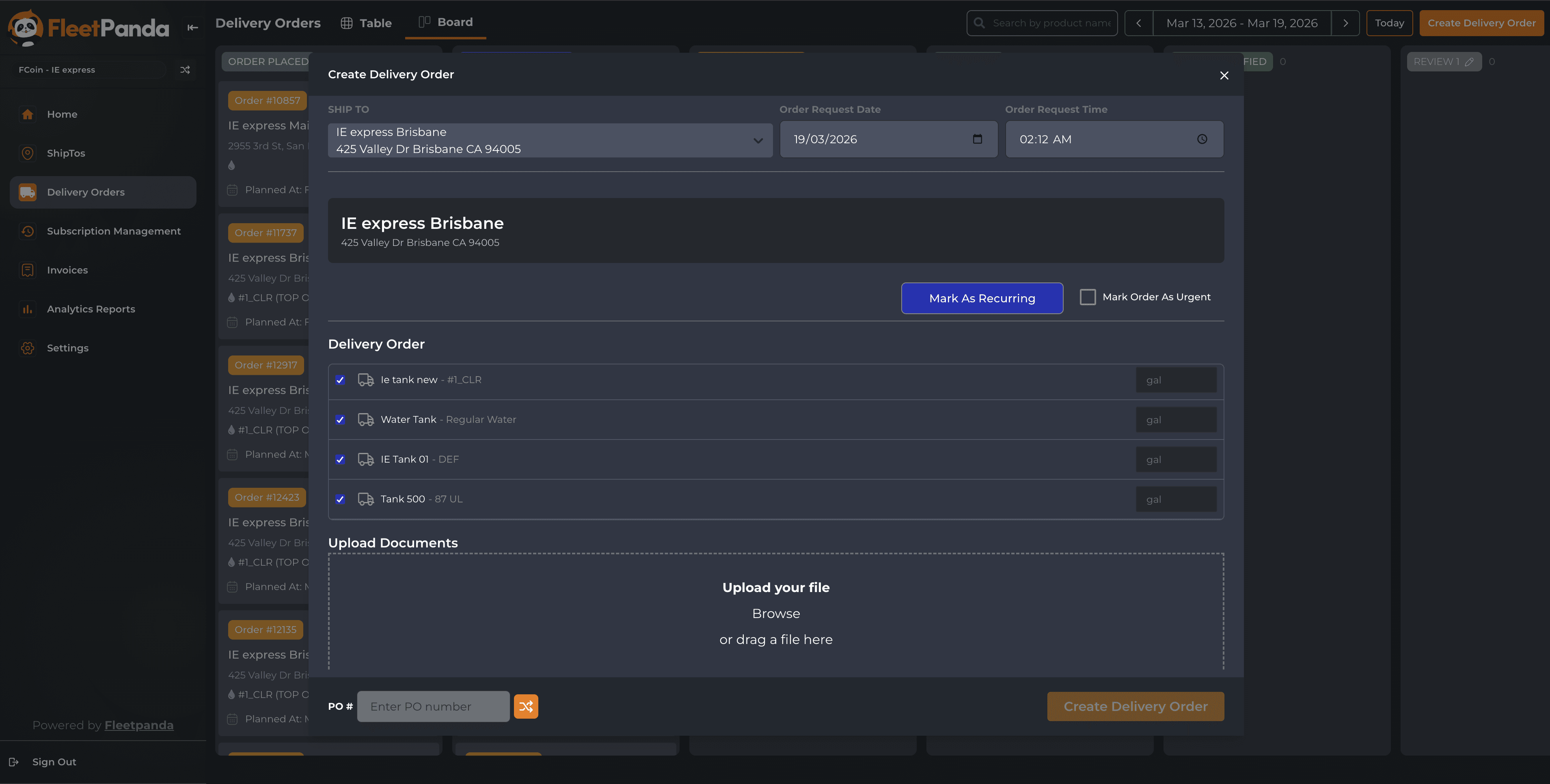
2. Order Hits Your Dispatcher’s Screen Immediately
The moment that order is submitted, it appears on your dispatcher’s order well in FleetPanda. No phone call, no email, no delay. Your dispatcher plans the delivery and assigns it to a driver just like any other order.
3. Customer Edits If Needed
Made a mistake? No problem. The customer can edit their order directly in the portal, as long as it hasn’t been assigned to a driver yet. The change shows up on the dispatcher’s end right away.
4. Real-Time Delivery Tracking
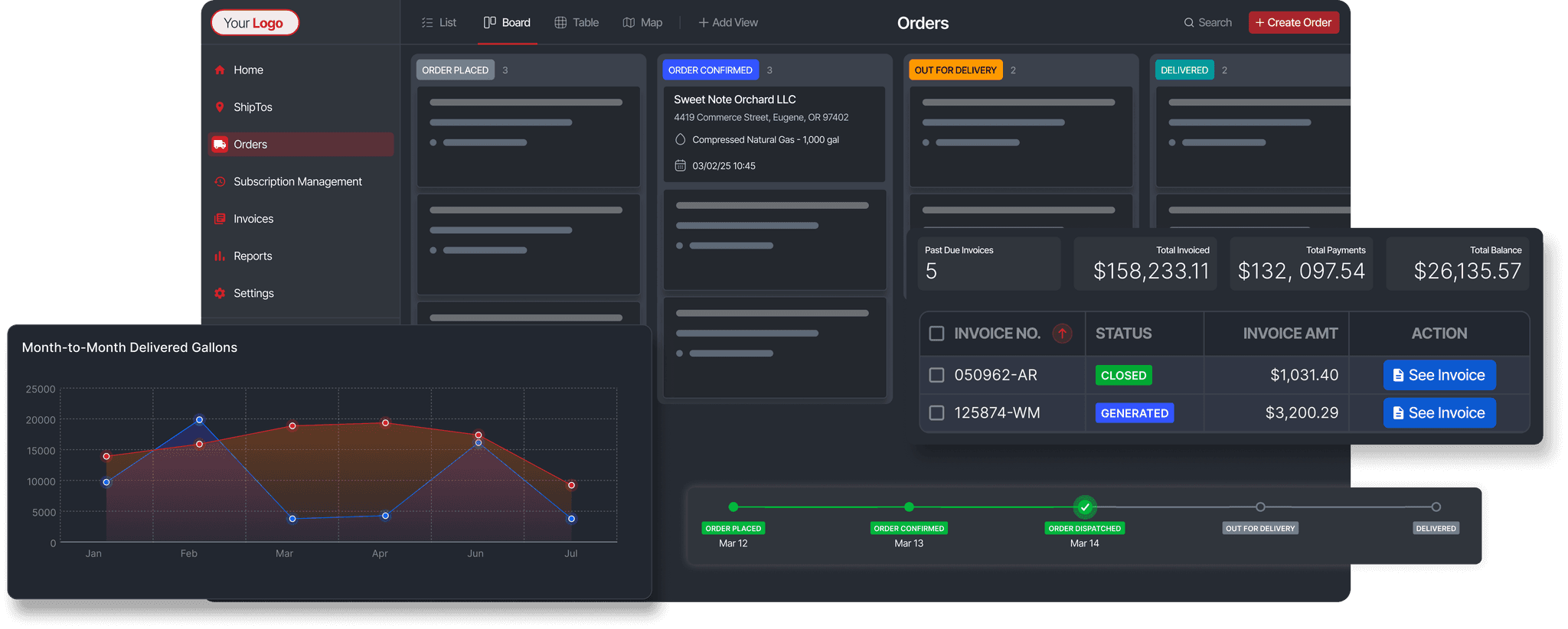
The customer follows their order through every stage: Order Placed, Order Confirmed, Out for Delivery, Delivered. Each status change comes with a timestamp. And every modification to the order is logged in an Activity trail, so there’s a full record of what happened and when.
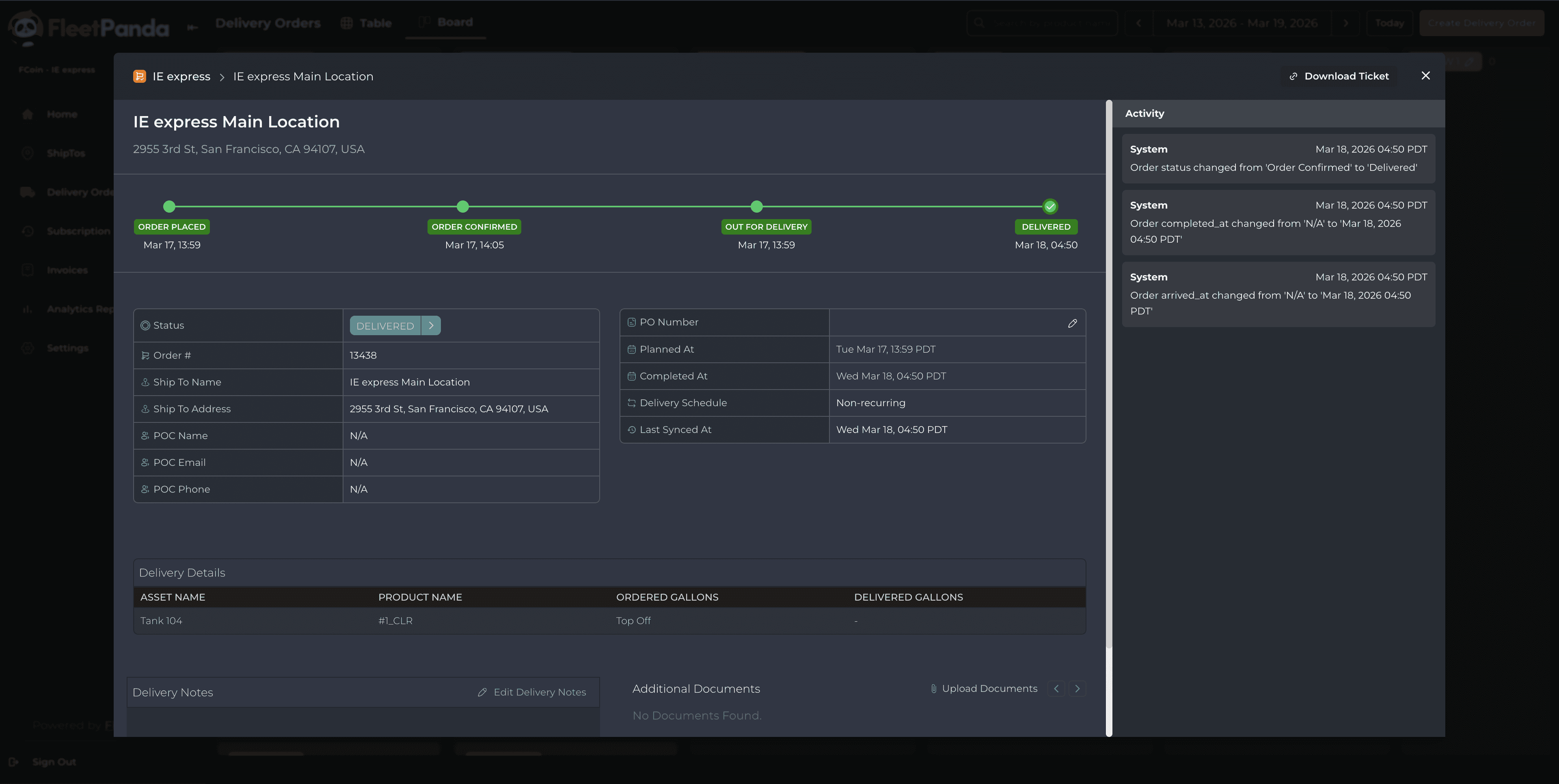
5. Instant Access to Documents
Once the delivery is done, the customer can download proof of delivery before the driver has even left the site. They can also pull up invoices anytime from the Invoices tab, with full details on status, amounts, and remaining balances.
What Your Customers See Inside the Portal
The portal is organized around the things your customers need to do:
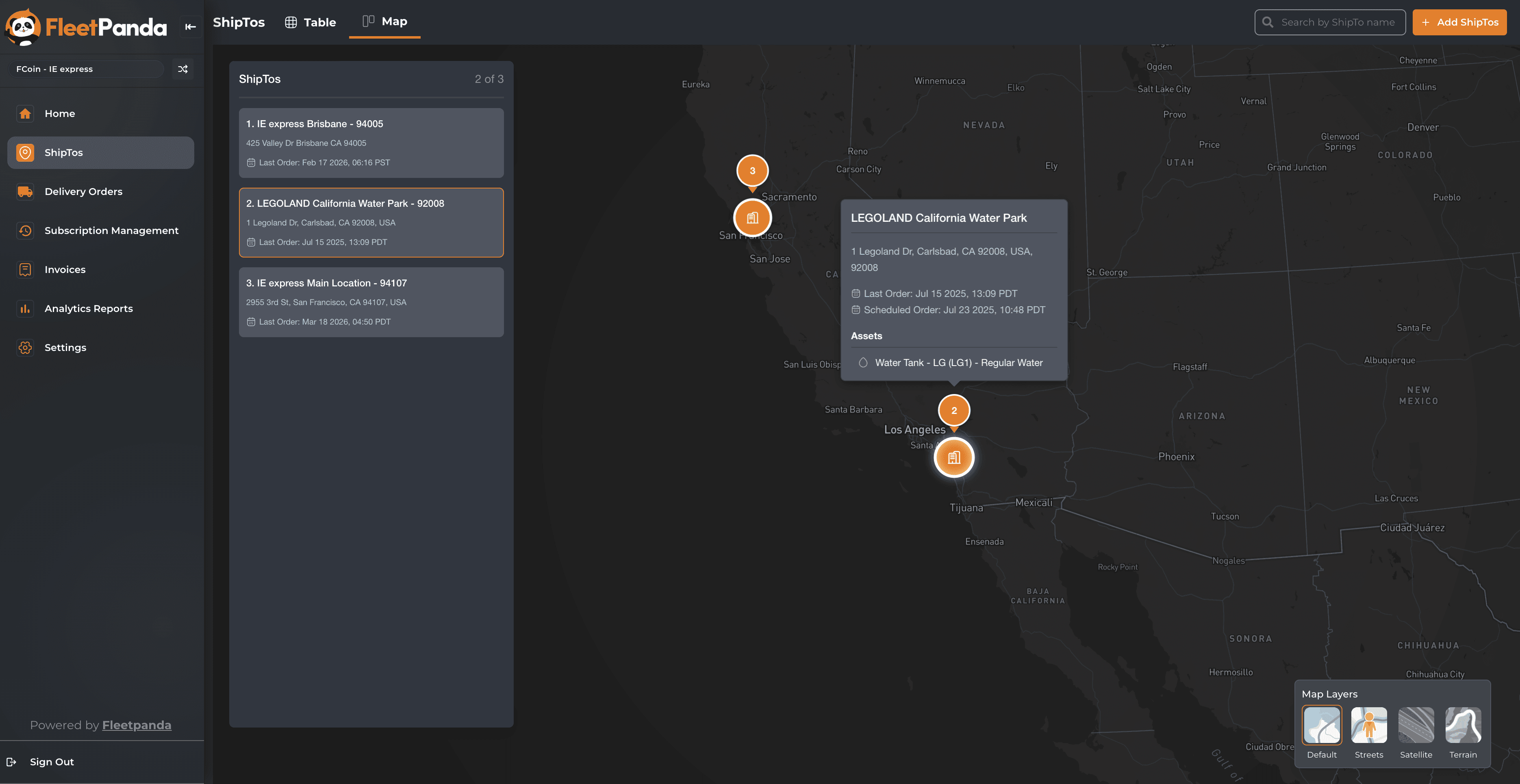
ShipTos lets them view all their delivery locations in a table or on an interactive map. They can add new locations directly from the portal (subject to your dispatcher’s approval).
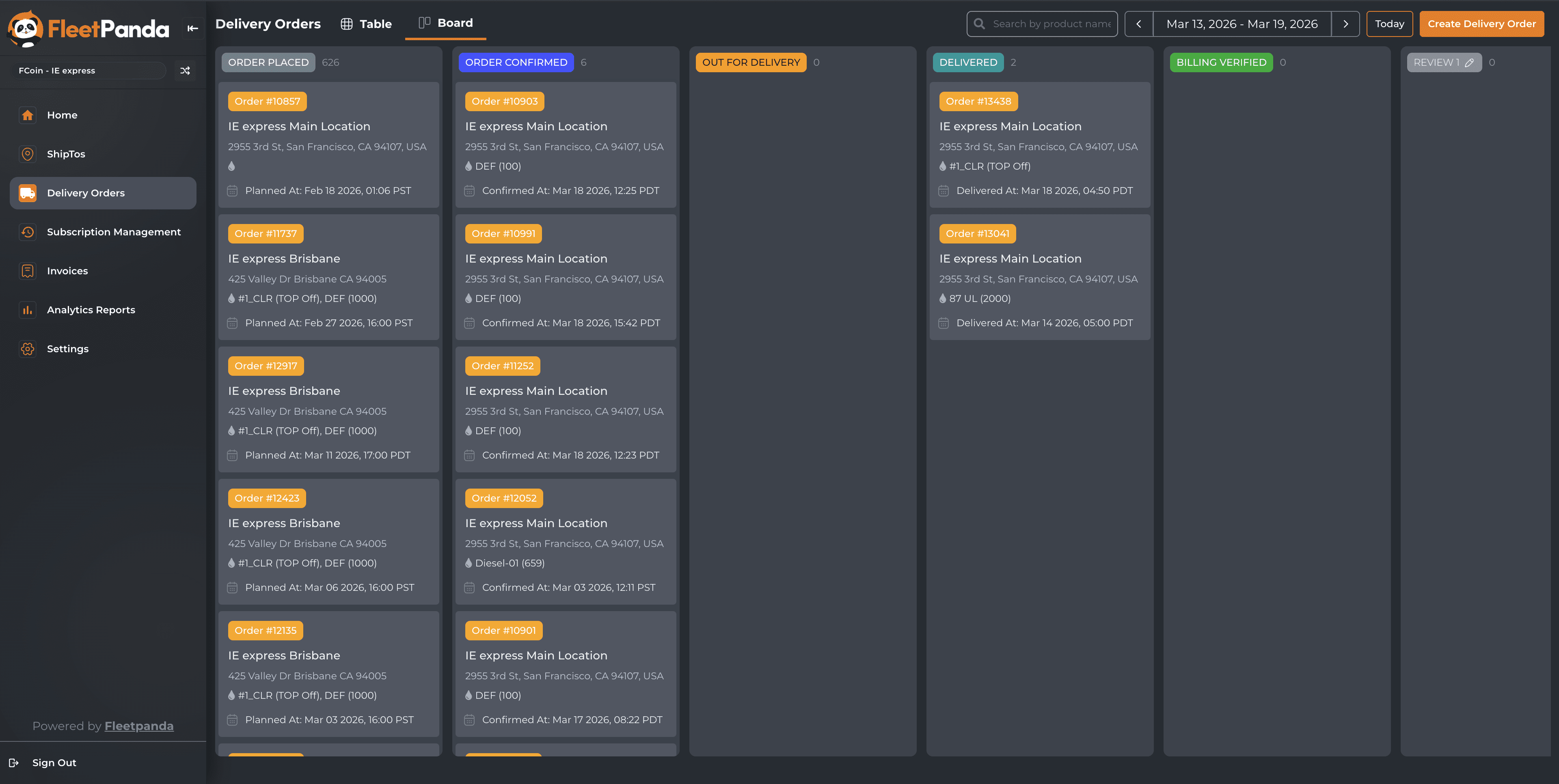
Delivery Orders gives them two ways to view orders. Table View shows everything in a sortable grid with columns for ShipTo, address, planned date, product, status, and gallons delivered. Board View organizes orders as cards by status (think Kanban), so they can see at a glance how many orders are at each stage.
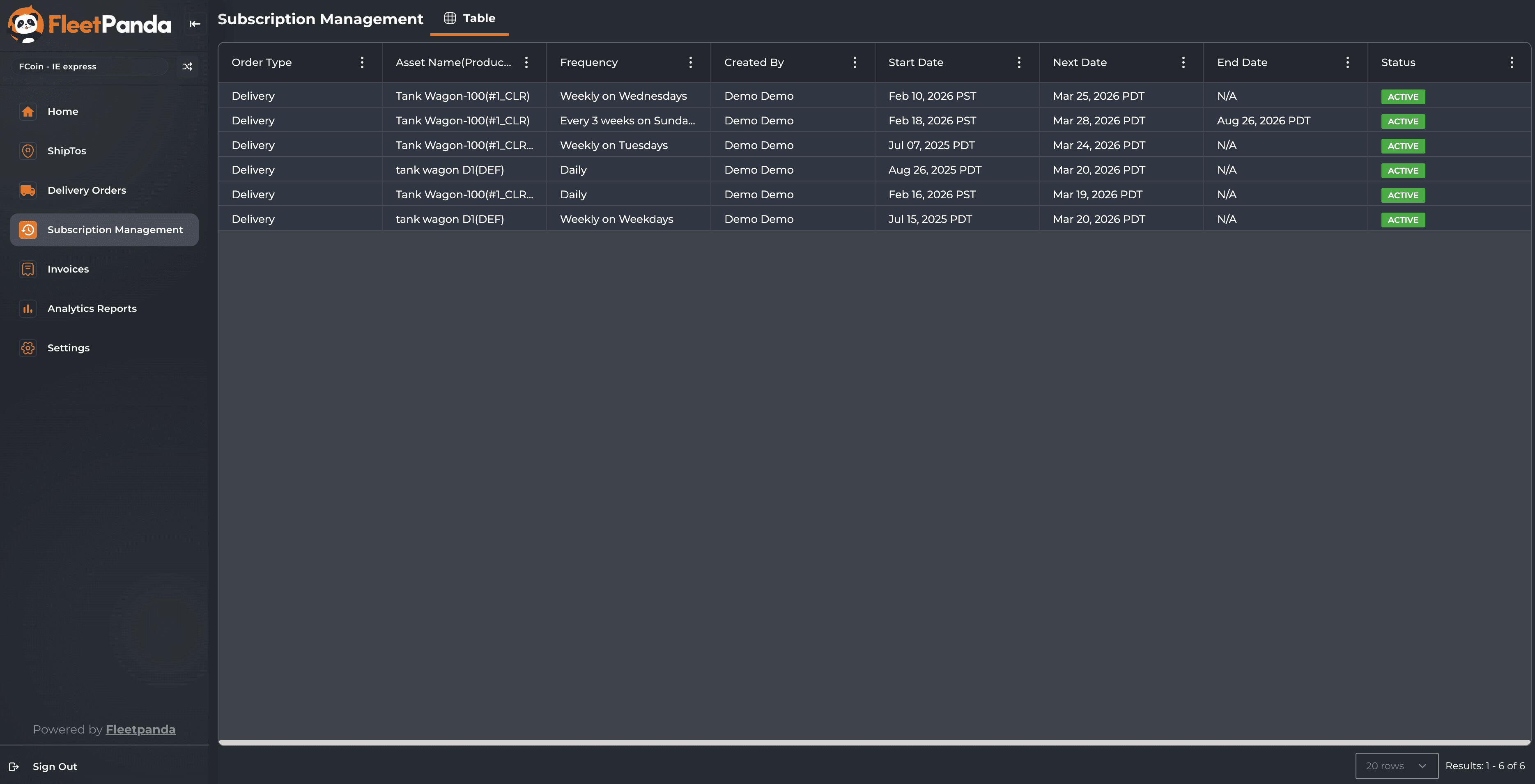
Subscription Management handles recurring deliveries. Your customers can view order type, frequency, start date, next delivery date, and status, all in one table.
Invoices displays every invoice with status, vendor, amounts paid, and remaining balance. Invoices sync automatically from Cargas, so your customers always see the latest information.
Analytics Reports give them dashboards directly in the portal for deeper reporting. Customers can schedule automated reports (daily, weekly, monthly) and have them delivered by email. They can also export reports as PDF or CSV.
Settings lets admin users invite teammates, manage roles, and view organization details like ShipTos, assets, and products.
Why This Matters for Your Business
Fewer phone calls, more capacity. Distributors using the portal are seeing an 80%+ drop in “where’s my order?” calls. That frees up your dispatchers and customer service team to focus on work that actually requires a human.
Faster payments. When customers can pull their own invoices and delivery tickets instantly, reconciliation on their end happens faster. Fewer disputes. Fewer delays. You get paid sooner.
Zero order entry errors. When the customer enters the order themselves, the right product, the right quantity, and the right delivery location are locked in from the start. No more wrong deliveries because of a miscommunication over the phone or a typo.
A clear advantage in competitive bids. When you’re going up against a competitor who’s still taking orders by phone and faxing delivery tickets, your customer portal is proof that you can handle a large corporate account at scale. This is the kind of technology that wins RFPs.
Multi-location accounts become manageable. If you’re working with customers who have 10, 20, or 50+ delivery points, the portal gives them a single login to manage all of it. They can view all ShipTos on a map, place orders for any location, and track everything from one place.
Customer retention gets easier. When your customers have full visibility into their orders, deliveries, and billing, and they can handle everything on their own schedule, they tend to stick with you. They don’t need to shop around because the experience is already working.
White Labeling: Your Brand, Front and Center
The portal is fully white-labeled. You upload your logo, pick your brand color, and the portal takes on your identity. Your customers log into a portal with your company name on it. Behind the scenes, FleetPanda powers everything, but your brand stays front and center.
You configure this from the Dispatch App under Operations > Customer Portal Configurations. Upload your logos, select your color, click Update Configuration, and you’re done.
How It Connects to the Rest of FleetPanda
The Customer Portal syncs directly with FleetPanda Dispatch. Orders placed in the portal show up on your dispatcher’s order well. Status changes made in Dispatch are reflected in the portal in real time. ShipTos, assets, and product data stay in sync across both platforms.
If you’re using Salesforce, the portal integrates there too. A new Salesforce Opportunity is automatically created when an order is placed, and the opportunity status maps to the order status.
And if you’re using Cargas for invoicing, invoice data syncs automatically into the portal so your customers always have access to the latest information.
The Bottom Line
Your customers expect to be able to place orders, track deliveries, and access their documents without having to pick up the phone. Every other industry has moved to self-service. Fuel distribution is catching up too.
The Customer Portal gives you a way to meet that expectation while also cutting down on order errors, freeing up your team’s time, getting paid faster, and standing out in every RFP.
If a customer still prefers the call-and-email way, they can do that and use the portal to get status updates. But for enterprise customers, a customer portal is becoming more and more of a need-to-have.
If you want to see the Customer Portal in action,book a demo with the team.